This is the first time I’m trying Workflows and I cannot make them work.
I need to run a simple automated task…
I have two modules inside a namespace. Module “Requests” and module “Inventory”. Inventory has a set of devices (records) that we own to borrow to different customers to run PoCs or tests, each of them with and exclusive Serial Number.
My idea is that when a user create a new request record, they should select one or more devices by its serial number and with a workflow, the selected Inventory records should be updated as “device in use”.
I’ve tried a lot of different ways to do this but the Inventory records were never updated.
Has anyone implemented something similar to this? Can you share which flow should I use?
Function: Compose Record Update Arguments:
record (ComposeRecord) = deviceRecord Results: Target: deviceRecord
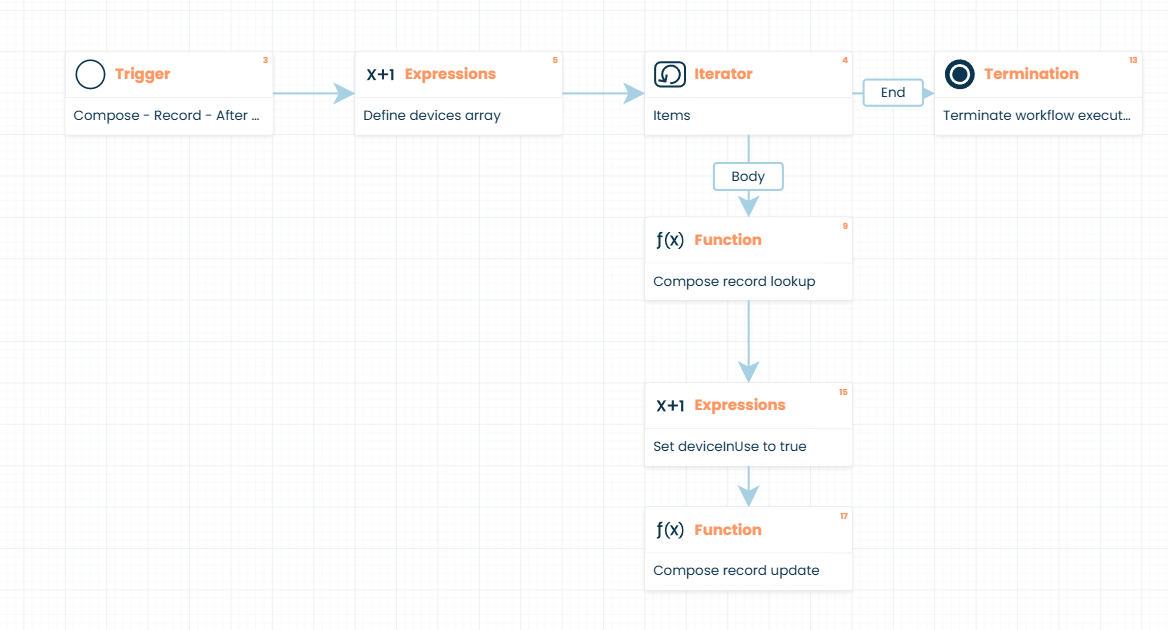
This workflow will loop through the devices assigned on your Request and switch their deviceInUse values to TRUE after the creation of the Request record.
Hello,
Let me see if i got what you meant.
On your “Inventory” module, you have a field where you can associate a device record, which belongs to another module and is that third module that contains the serial number?
If so then you could make a workflow that triggers after the request creation that would search the inventory module for the ids of the selected devices on the request, assuming you are selecting them on the request itself and saving them on the module with a multiple select record field. For this, you would need to iterater over this array of devices and search for them on the inventory module based on the device id and update them like you wanted.
If you could clarify these points and explain your modules or whats causing you problems then i can try to better help you.
You’ll want to figure out a way to close out Requests so that you can make the devices available for assignment again.
Is there a time delay between the assignment of a device to a request, and the customer checking out that piece of gear? If so, and there are multiple users, you run the risk of doubling up equipment assignments by doing it this way. Make sure you’re accounting for temporal (time) considerations in your business process.
Editing the equipment assignments for existing Requests using your structure will be problematic. It’s easy enough to add new Devices to a request, but removing them is a problem - I’m not aware of a way to identify items that have been removed from an array.
I’ve test this, but I can not get the inventory record updated. How can I debug the process to test where is the error? In Session logs it shows the workflow completed.
You might also try putting a Non-Blocking Message to User prompt in between steps 15 and 17 in my sample workflow. Use the message to display the device name and the deviceInUse values as they are being addressed by the iterator (after you change the deviceInUse value to true). That’s the technique I use to monitor variables throughout a workflow as I’m testing.
Are you using a Checkbox for your inUse field? Or a Select/Dropdown?
If you can export your modules and attach them, I can see how you have structured your data.
Offhand, if you are using a Checkbox for the inUse field on your inventory, then in step 12 of your workflow, you want the expression settings to be:
Target: Inventory_to_Mark.values.inUse (Boolean)
Expression: true (yes will also work, if it’s all lowercase. Your workflow has it capitalized, and that may register as false, rather than true – that may be your problem here)